GitHub Repo Notes

Add local notes to GitHub repository

目前為 2025-05-14 提交的版本,檢視 最新版本

您需要先安裝使用者腳本管理器擴展,如 TampermonkeyGreasemonkeyViolentmonkey 之後才能安裝該腳本。

You will need to install an extension such as Tampermonkey to install this script.

您需要先安裝使用者腳本管理器擴充功能,如 TampermonkeyViolentmonkey 後才能安裝該腳本。

您需要先安裝使用者腳本管理器擴充功能,如 TampermonkeyUserscripts 後才能安裝該腳本。

你需要先安裝一款使用者腳本管理器擴展,比如 Tampermonkey,才能安裝此腳本

您需要先安裝使用者腳本管理器擴充功能後才能安裝該腳本。

(我已經安裝了使用者腳本管理器,讓我安裝!)

你需要先安裝一款使用者樣式管理器擴展,比如 Stylus,才能安裝此樣式

你需要先安裝一款使用者樣式管理器擴展,比如 Stylus,才能安裝此樣式

你需要先安裝一款使用者樣式管理器擴展,比如 Stylus,才能安裝此樣式

你需要先安裝一款使用者樣式管理器擴展後才能安裝此樣式

你需要先安裝一款使用者樣式管理器擴展後才能安裝此樣式

你需要先安裝一款使用者樣式管理器擴展後才能安裝此樣式

(我已經安裝了使用者樣式管理器,讓我安裝!)

作者
Ivans-11
評價
0 0 0
版本
1.0
建立日期
2025-05-14
更新日期
2025-05-14
尺寸
10.1 KB
授權條款
MIT
腳本執行於

GitHub Repo Notes

A Tampermonkey script that allows you to add local notes to GitHub repositories

Features

  • Add and modify notes for repositories in GitHub repository list or detail pages
  • Notes are saved in local storage and invisible to other users

Usage

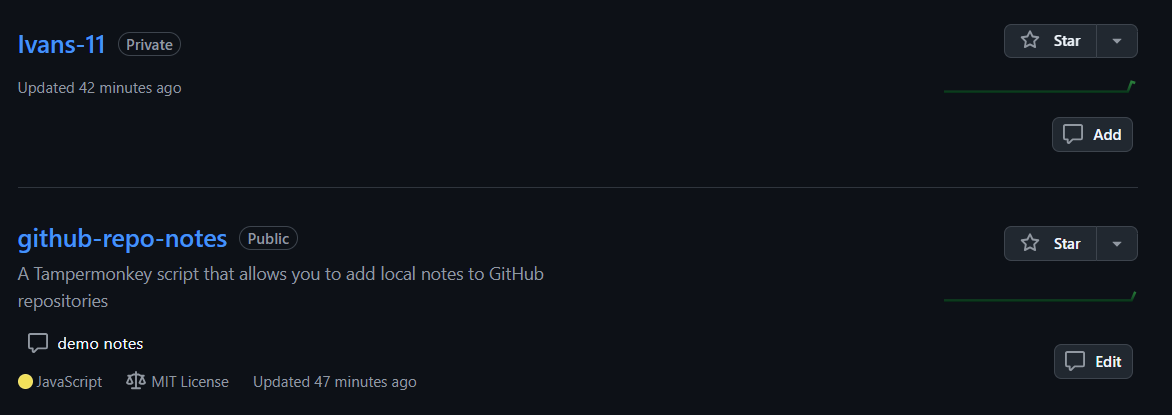
  1. On GitHub repository list page:

    Repository List Demo

    • A note button appears on each repository card
    • Click the button to add or edit notes
    • Notes are displayed on the repository card
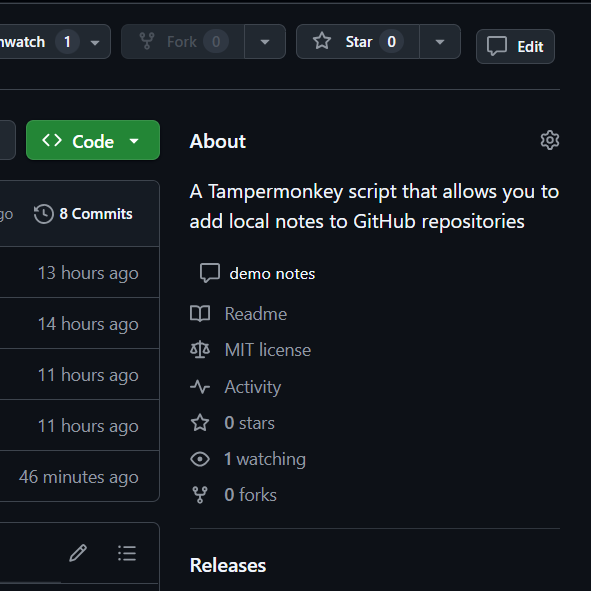
  2. On repository detail page:

    Repository Detail Demo

    • A note button appears in the top action bar
    • Click the button to add or edit notes
    • Notes are displayed below the repository description

Notes

  • Note data is saved in browser's local storage
  • Clearing browser data will result in data loss
  • Notes are not synchronized between different browsers