FictionLab Enhanced

Add new features to FictionLab.ai and hide UI elements

您需要先安裝使用者腳本管理器擴展,如 TampermonkeyGreasemonkeyViolentmonkey 之後才能安裝該腳本。

You will need to install an extension such as Tampermonkey to install this script.

您需要先安裝使用者腳本管理器擴充功能,如 TampermonkeyViolentmonkey 後才能安裝該腳本。

您需要先安裝使用者腳本管理器擴充功能,如 TampermonkeyUserscripts 後才能安裝該腳本。

你需要先安裝一款使用者腳本管理器擴展,比如 Tampermonkey,才能安裝此腳本

您需要先安裝使用者腳本管理器擴充功能後才能安裝該腳本。

(我已經安裝了使用者腳本管理器,讓我安裝!)

你需要先安裝一款使用者樣式管理器擴展,比如 Stylus,才能安裝此樣式

你需要先安裝一款使用者樣式管理器擴展,比如 Stylus,才能安裝此樣式

你需要先安裝一款使用者樣式管理器擴展,比如 Stylus,才能安裝此樣式

你需要先安裝一款使用者樣式管理器擴展後才能安裝此樣式

你需要先安裝一款使用者樣式管理器擴展後才能安裝此樣式

你需要先安裝一款使用者樣式管理器擴展後才能安裝此樣式

(我已經安裝了使用者樣式管理器,讓我安裝!)

作者
Skeleton8595
今日安裝
0
安裝總數
0
評價
0 0 0
版本
0.1
建立日期
2025-12-28
更新日期
2025-12-28
尺寸
27.7 KB
授權條款
MIT
腳本執行於

Add new features to FictionLab.ai and hide UI elements you don't want to see.

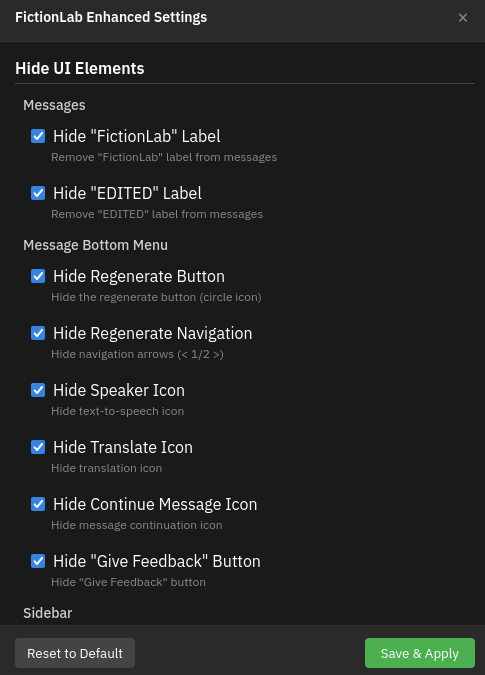
How to change settings?

Open Fictionlab, click your Userscript Extension Icon -> FictionLab Enhanced Settings

If you don't have a settings menu, look for a better Userscript Extension

Current features:

Hide UI Elements

Messages

  • Hide "FictionLab" Label – Remove "FictionLab" label from messages
  • Hide "EDITED" Label – Remove "EDITED" label from messages

Message Bottom Menu

  • Hide Regenerate Button – Hide the regenerate button (circle icon)
  • Hide Regenerate Navigation – Hide navigation arrows (< 1/2 >)
  • Hide Speaker Icon – Hide text-to-speech icon
  • Hide Translate Icon – Hide translation icon
  • Hide Continue Message Icon – Hide message continuation icon
  • Hide "Give Feedback" Button – Hide "Give Feedback" button

Sidebar

  • Hide "Home Page" – Hide "Home Page" button from sidebar
  • Hide "My Scenarios" – Hide "My Scenarios" button from sidebar
  • Hide "Create Content" – Hide "Create Content" button from sidebar
  • Hide "Try FictionLab+" – Hide "Try FictionLab+" button from sidebar

Other

  • Hide AI Reminder – Hide "Everything is AI" text
  • Hide Suggestion Button – Hide suggestion button (lightbulb)
  • Hide Ratingbox – Hide "What do you think about this scenario?"
  • Hide FictionLab+ Popup – Hide FictionLab+ popups

Chat Header

  • Hide Completely – Completely hide the header
  • Show on Hover – Hide by default, show on hover

Keyboard

  • Enter Key – Press enter to trigger "continue message"
  • Arrow Keys – Use left and right arrow to generate a new message/switch between them

Experimental

  • Hide "continue" Messages – Hide messages that only contain "continue"

Settings menu