Vinted Country & City Filter (Client-side) v1.4.1.1
Description
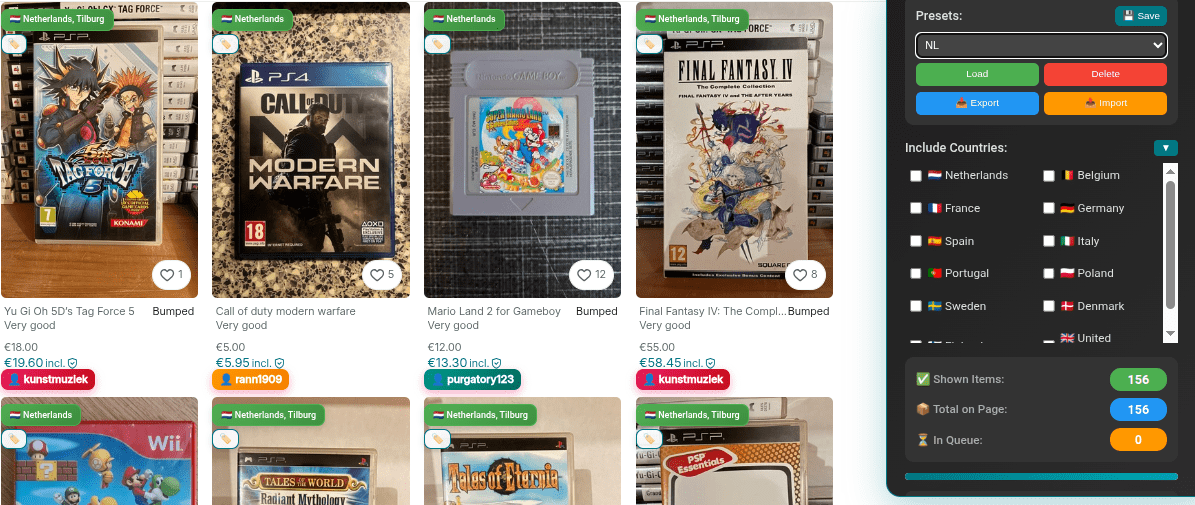
This userscript enhances the Vinted website by displaying the seller's country and city directly on item listings with country flags and allows you to visually filter by multiple countries.
The script works entirely client-side and uses Vinted's own public item API to retrieve location information with intelligent caching that stores data forever to avoid repeated API calls.
It does not modify search results, does not interact with your account, and does not perform automated actions such as buying, messaging, or following users.
Filtering is purely visual: excluded countries are faded and grayscaled, while matching items remain fully visible.
You can select multiple countries to include at any time, and the results update instantly without reloading the page.
When filtering is disabled, no items are hidden or de-emphasized, and the script simply displays the country and city for each item whenever available.
✅ Changelog: https://github.com/Nigel1992/Vinted-Geo-Locator/blob/main/CHANGELOG.md
✅ New Features: https://github.com/Nigel1992/Vinted-Geo-Locator/blob/main/NEW_FEATURES.md
How it works
- When item cards appear on a Vinted page, the script detects their item IDs.
- For each item, it first checks cached location data in localStorage, then fetches from Vinted's API if needed.
- Location data is cached forever to avoid repeated API calls and improve performance.
- To respect Vinted's API limits, the script processes approximately one item per second.
- Item information appears gradually, especially on pages with many listings.
- The seller's country and city with flag are shown as a small overlay on the item card.
- A sleek, draggable floating menu allows you to select multiple countries to include.
- Items are updated immediately when the filter is changed.
- Live statistics show matching items, total scanned, and items in processing queue.
- When filtering is disabled, all items remain fully visible while still showing location information.
- Automatic captcha detection and popup solver when API is blocked.
- Language detection ensures the script only works when Vinted is set to English.
- Duplicate seller detection highlights items from the same seller with color-coded badges.
Performance and rate limits
- The default processing speed is about one API request per second.
- This delay is intentionally conservative to reduce the risk of rate limiting or captchas.
- Advanced users may edit the script and lower the delay to load item locations faster.
- Increasing the request speed may result in:
- More frequent 429 (Too Many Requests) responses
- 403 (captcha) challenges
- Temporary API blocking by Vinted
- Any changes to the delay are done at the user's own risk.
Features
- 🏳️ Country flags — Instantly see where each item ships from with flag badges
- 🎯 Multi-country filtering — Select multiple countries to show/hide items
- 💾 Intelligent caching — Location data is cached forever, no repeated API calls
- 📊 Live statistics — Track matching items, total scanned, and queue progress
- 🎨 Sleek, draggable UI — Minimalist floating panel that stays out of your way
- 🌙 Dark mode — Toggle between light and dark themes
- ⏸️ Pause/Resume — Control processing with one click
- 💾 Preset management — Save, load, delete, export, and import filter presets
- 🏷️ Seller flagging — Flag/unflag sellers for quick identification
- 👥 Duplicate detection — Color-coded badges show items from the same seller
- 🔓 Auto captcha solver — Automatically detects and opens captcha popup for resolution
- 🌐 Language detection — Only works when Vinted is set to English
- 📈 Progress tracking — Visual progress bar shows scanning completion
- 🗑️ Cache management — Clear cached data with one click
- 📊 Stats reset — Reset statistics counters when needed
- ⚡ Lightweight — Pure JavaScript, no external dependencies
- ⏱️ Rate-limited processing (~1 item per second by default)
- 🛑 Automatically pauses on 403 (captcha) or 429 (rate limit)
- 🧠 Remembers filter settings, dark mode, and collapsed state during the session
- 🔒 No tracking, no ads, no data sent to third parties
- 📖 Fully readable, non-obfuscated source code
- 🏠 Works on homepage and category/search pages
- ⌨️ Keyboard shortcut — Press Alt+V to toggle menu
New in v1.4.1.1
- 🔧 Click fix — Items with duplicate seller badges are now fully clickable
- 🎯 Improved badge positioning — All badges properly positioned to avoid blocking clicks
- 🐛 Bug fixes — Various stability improvements
New in v1.4.0+
- 🌙 Dark mode — Beautiful dark theme for comfortable browsing
- ⏸️ Pause/Resume — Control when the script processes items
- 💾 Preset system — Save and manage multiple filter configurations
- 📥📤 Import/Export — Share presets between devices or browsers
- 🏷️ Seller flagging — Mark sellers for easy identification
- 👥 Duplicate detection — Color-coded badges for items from the same seller
- 📊 Enhanced statistics — More detailed tracking of processed items
- 🎨 Collapsible sections — Minimize country list to save space
- ⌨️ Keyboard shortcuts — Quick menu toggle with Alt+V
Important notes (please read)
- Language: Set Vinted to English for the script to work correctly
- This script uses Vinted's own API to fetch item details.
- Because of API rate limits, item locations are not loaded all at once.
- Scrolling very fast or opening pages with many items may temporarily increase the queue.
- Filtering is visual only and does not change Vinted's internal search or ranking.
- Duplicate detection is based on seller usernames when available.
What this script does NOT do
- ❌ Does not automate purchases or messages
- ❌ Does not change prices, visibility, or rankings on Vinted
- ❌ Does not bypass paywalls, security, or authentication
- ❌ Does not collect or transmit personal data
- ❌ Does not modify server-side search results
Usage instructions
- Install the script using a userscript manager (e.g. Tampermonkey).
- Set Vinted to English in your language settings for the script to work.
- Open Vinted and browse items as usual.
- Use the Location Filter floating menu on the right side of the page.
- Toggle "Filter Active" to enable/disable filtering.
- Check countries to include in your filter (multiple selection allowed).
- Watch live statistics show matching items, total scanned, and queue progress.
- Toggle dark mode with the 🌙/☀️ button for comfortable viewing.
- Pause/Resume processing with the ⏸/▶ button as needed.
- Save presets to quickly switch between different country filters.
- Flag sellers by clicking the 🏷️ badge to mark them for future reference.
- Duplicate badges (👤) show items from the same seller with color-coded gradients.
- Drag the menu to reposition it if needed, or minimize with the − button.
- Press Alt+V to quickly toggle menu visibility.
- If API is blocked, solve the automatic captcha popup and resume.
- Clear cache if you want to refresh all location data.
- Export presets to save your configurations as JSON files.
- Import presets to load saved configurations from other devices.
Compatibility
- Tested on:
- vinted.nl
- vinted.be
- vinted.fr
- vinted.de
- vinted.es
- vinted.it
- vinted.se
Troubleshooting
- Items not clickable? — Make sure you're running the latest version (v1.4.1.1+)
- No location data showing? — Check that Vinted is set to English
- Captcha appearing? — Complete the automatic popup and click Resume
- Items loading slowly? — This is normal due to API rate limiting
- Filter not working? — Make sure "Filter Active" is toggled ON
License
This script is released under the MIT License.
You are free to use, modify, and redistribute it, provided the license notice is retained.

