UTags Shortcuts

Floating or sidebar quick navigation with per-site groups, icons, JS script execution, and editable items.

您需要先安裝使用者腳本管理器擴展,如 TampermonkeyGreasemonkeyViolentmonkey 之後才能安裝該腳本。

You will need to install an extension such as Tampermonkey to install this script.

您需要先安裝使用者腳本管理器擴充功能,如 TampermonkeyViolentmonkey 後才能安裝該腳本。

您需要先安裝使用者腳本管理器擴充功能,如 TampermonkeyUserscripts 後才能安裝該腳本。

你需要先安裝一款使用者腳本管理器擴展,比如 Tampermonkey,才能安裝此腳本

您需要先安裝使用者腳本管理器擴充功能後才能安裝該腳本。

(我已經安裝了使用者腳本管理器,讓我安裝!)

你需要先安裝一款使用者樣式管理器擴展,比如 Stylus,才能安裝此樣式

你需要先安裝一款使用者樣式管理器擴展,比如 Stylus,才能安裝此樣式

你需要先安裝一款使用者樣式管理器擴展,比如 Stylus,才能安裝此樣式

你需要先安裝一款使用者樣式管理器擴展後才能安裝此樣式

你需要先安裝一款使用者樣式管理器擴展後才能安裝此樣式

你需要先安裝一款使用者樣式管理器擴展後才能安裝此樣式

(我已經安裝了使用者樣式管理器,讓我安裝!)

作者
Pipecraft
今日安裝
1
安裝總數
11
評價
0 0 0
版本
0.2.5
建立日期
2025-12-10
更新日期
2025-12-24
尺寸
280.6 KB
授權條款
MIT
腳本執行於
所有網站

UTags Shortcuts

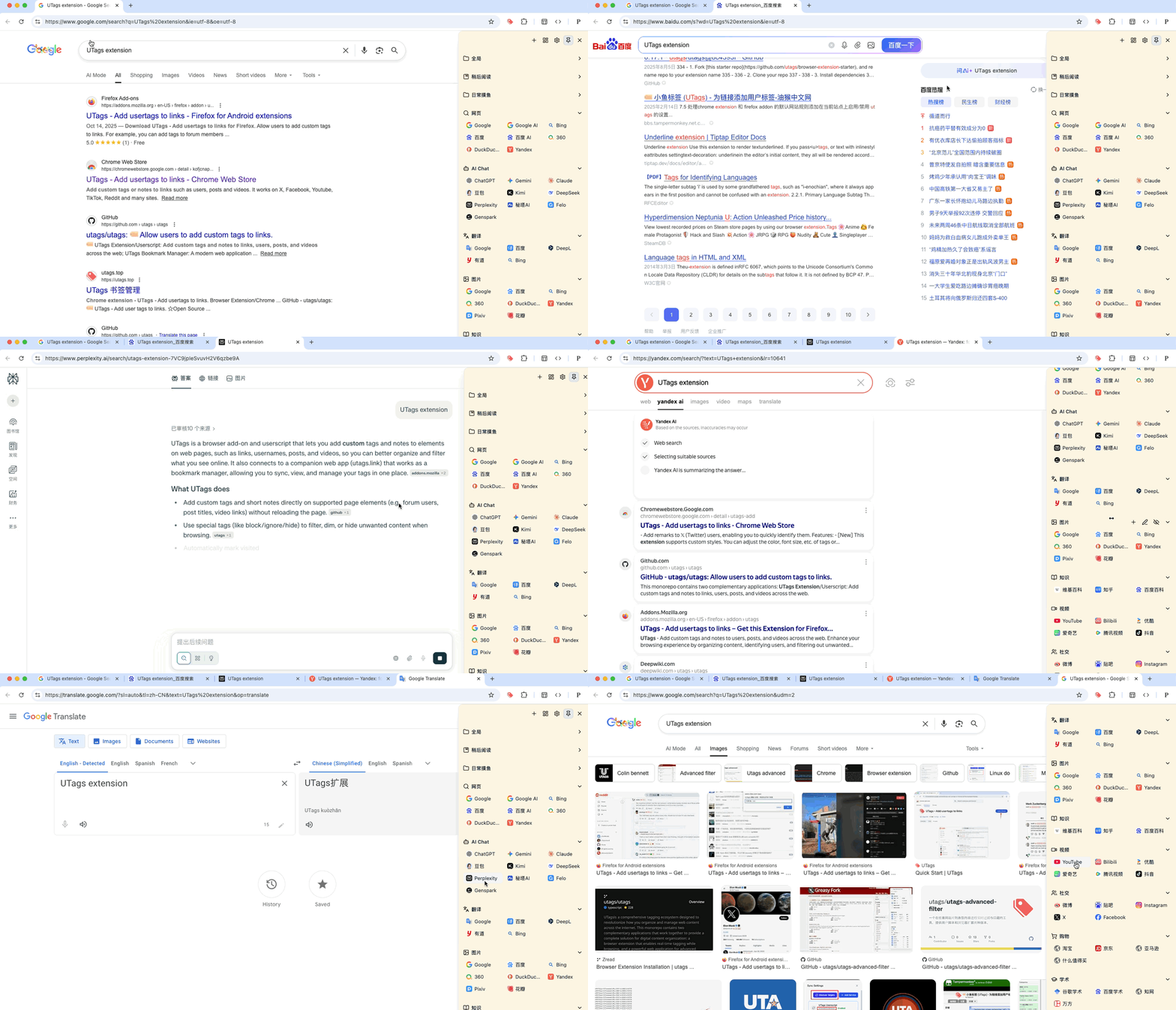
UTags Shortcuts is a powerful userscript that provides a floating or sidebar navigation panel for quick access to your favorite links and scripts. It features per-site grouping, icon support, and versatile customization options, making it an essential tool for power users who want to streamline their browsing workflow.

中文文档

screenshot screenshot screenshot screenshot screenshot screenshot screenshot screenshot screenshot screenshot

Key Features

  • Per-Site Grouping: Automatically displays relevant navigation groups based on the website you are currently visiting. Configure groups to appear on specific domains or URL patterns.
  • Two Display Modes:
    • Floating Mode: A discreet floating icon that expands on hover, perfect for saving screen space.
    • Sidebar Mode: A fixed sidebar (left or right) for quick and always-visible access, ideal for wide screens.
  • Versatile Items:
    • URLs: Add quick links to any webpage. Supports relative paths to the current page.
    • JS Scripts: Execute small JavaScript snippets directly from the menu for quick automation.
  • Visual Customization:
    • Icons: Automatically fetches favicons or supports custom icon URLs.
    • Themes: seamlessly adapts to system or website themes (Light/Dark/System).
  • Easy Management:
    • Quick Add: Instantly add the current page to a group.
    • Visual Editor: Drag-and-drop to reorder items, manage groups, and edit properties via a user-friendly interface.
  • Keyboard Shortcuts: Toggle the panel instantly with Alt+Shift+K.

Installation

Usage

  1. Opening the Panel:
    • Hover over the "edge strip" (default: top-right edge of the screen).
    • Or use the shortcut Alt+Shift+K.
  2. Adding Links:
    • Open the panel and click the + button at the bottom to add the current page to a group.
    • You can choose which group to add the link to or create a new group.
  3. Managing Items:
    • Right-click the floating icon or click the Settings button in the panel to open the configuration modal.
    • Here you can:
      • Create, edit, or delete groups.
      • Add or edit specific items (Links or Scripts).
      • Change matching rules for when groups should appear.
      • Adjust layout preferences (Floating vs. Sidebar).

Use Cases

  • Site-Specific Tools: Create a "GitHub" group that only appears on github.com, containing links to your Issues, Pull Requests, and Profile.
  • Global Toolbox: Create a "Tools" group that appears on every site (*), offering quick access to translation services, JSON formatters, or note-taking apps.
  • Reading Assistant: Add "Next Chapter" or "Previous Chapter" scripts/links for your favorite novel reading sites.
  • Development Helper: Execute quick JS snippets to fill forms, clear cache, or switch environments.

Configuration

Access the settings panel to customize:

  • Layout Mode: Switch between Floating and Sidebar.
  • Sidebar Position: Left or Right.
  • Default Open Behavior: Open links in the same tab or a new tab.
  • Appearance: Adjust the size, opacity, and color of the edge trigger strip.
  • Hotkey: Customize the toggle shortcut.

Supported Variables

You can use the following variables in the URL field. They will be replaced with the corresponding values from the current page:

  • {hostname}: Current hostname (e.g., www.google.com).
  • {hostname_without_www}: Hostname without www. prefix (e.g., google.com).
  • {hostname_top_level}: Top-level domain extracted from current URL (e.g., google.com, bbc.co.uk).
  • {current_url}: Full URL of the current page.
  • {current_url_encoded}: URL-encoded full URL.
  • {current_title}: Title of the current page.
  • {query}: Search keywords extracted from URL parameters (automatically detects q, query, kw, wd, keyword, p, s, term).
  • {selected}: Currently selected text on the page.
  • {q:param}: Value of the specified query parameter (e.g., {q:id} for ?id=123).
  • {p:n}: The n-th path segment of the URL (e.g., {p:1} gets foo from /foo/bar).
  • {t:text}: Returns the text directly (e.g., {t:hello}).
  • Fallback: Use || to define a fallback value (e.g., {selected||query||t:default}).

Changelog

v0.2.5

  • Refined SPA Navigation in Iframe Mode: Improved the navigation logic by using message passing between parent and iframe, ensuring proper SPA routing handling (e.g. Next.js, Vue Router) instead of forcing a reload.
  • Improved SPA Support in Iframe Mode: Fixed an issue where navigation in Single Page Applications (SPAs) within the sidebar might not correctly update the iframe support status.
  • Enhanced Stability: Refactored the iframe detection logic to better handle infinite reload loops and improve overall stability.
  • Improved SPA (Single Page Application) navigation experience: Added a loading progress bar at the top of the page when navigating in Iframe mode or via Next.js router.
  • Optimized image loading: Enabled lazy loading for all icons and images to improve initial page load performance.
  • Refactored internal code: Extracted image generation logic into a factory method for better maintainability.

v0.2.3

  • Improved panel collapse behavior: the panel now stays expanded when the mouse leaves the window or hovers over the scrollbar.

v0.2.2

  • Optimized the rendering logic of the panel to reduce UI flickering during state updates.
  • Fixed an issue where the panel might overlap with the modal mask.

v0.2.1

  • Implemented image caching mechanism to prevent redundant network requests and improve rendering performance for icons.

v0.2.0

  • Iframe Mode: The sidebar now runs in an isolated iframe environment by default, improving compatibility and stability across different websites.
    • Automatically handles CSP (Content Security Policy) restrictions.
    • Ensures styles and scripts don't conflict with the host page.
    • Supports cross-origin navigation: External links open in the top frame, while homologous links load within the iframe.
    • Maintains state synchronization (URL, title, favicon) between the iframe and the main window.
  • Optimized keyboard event handling for better compatibility with other scripts.
  • Improved SPA (Single Page Application) support with dynamic title monitoring.

v0.1.22

  • Automatically imports built-in shortcuts from remote source upon initialization.

v0.1.21

  • Fixed an issue where styles could not be injected on websites with strict CSP (Content Security Policy).

v0.1.20

  • Optimized data import functionality: Added support for importing from URL and pasting text

v0.1.16

  • Added group display style options: "Icon+Title", "Icon Only", and "Title Only".
  • Added panel background color setting with presets.
  • Improved "Icons Per Row" setting UX.

v0.1.14

  • Support dragging and dropping links from the web page to groups.

v0.1.12

  • Support more URL variables: {q:param}, {p:n}, {t:text}, {te:text}.

v0.1.6

  • Added sidebar mode.
  • Added JS script execution support.
  • Improved UI and customization options.

More Useful Scripts

🏷️ UTags - Add User Tags to Links

  • Link: Greasy Fork
  • Features: Add custom tags and notes to user, post, video and other links
  • Highlights: Support special tag filtering (like spam, block, clickbait, etc.), data export/import, auto-mark viewed posts
  • Supported Sites: V2EX, X(Twitter), Reddit, GitHub, Bilibili, Zhihu, Linux.do, Youtube and 50+ websites
  • Description: Super useful tag management tool for adding tags to forum users or posts, making it easy to identify or block low-quality content

🧰 UTags Advanced Filter

  • Link: Greasy Fork · ScriptCat · GitHub Raw
  • Features: Real-time filtering and hiding of scripts on GreasyFork
  • Highlights: Available as both a userscript and a browser extension
  • Supported Sites: Greasy Fork
  • Description: A tool that supports real-time filtering and hiding on GreasyFork, available in userscript and browser extension versions

🔗 Links Helper

  • Link: Greasy Fork
  • Features: Open third-party website links in new tabs, parse text links into hyperlinks
  • Highlights: Support custom rules, parse Markdown and BBCode formats, convert image links to image tags
  • Supported Sites: Universal for all websites, including Google, YouTube, GitHub, V2EX, etc.
  • Description: Enhance link browsing experience, automatically process various link formats for more convenient web browsing

🔍 Find Scripts For This Site

  • Link: Greasy Fork · ScriptCat · GitHub
  • Features: Quickly find scripts for the current site across multiple repositories
  • Highlights: Settings dialog, real-time sync, smart domain extraction
  • Supported Sites: All websites
  • Description: A user script to quickly find scripts for the current site across multiple repositories, now with a settings dialog and real-time sync across tabs

License

MIT License — see LICENSE

Related Links