AO3: Chapter Shortcuts

Add shortcuts for first and last chapters on AO3 works. Customize the latest chapter symbol on work titles.

您需要先安裝使用者腳本管理器擴展,如 TampermonkeyGreasemonkeyViolentmonkey 之後才能安裝該腳本。

您需要先安裝使用者腳本管理器擴充功能,如 TampermonkeyViolentmonkey 後才能安裝該腳本。

您需要先安裝使用者腳本管理器擴充功能,如 TampermonkeyViolentmonkey 後才能安裝該腳本。

您需要先安裝使用者腳本管理器擴充功能,如 TampermonkeyUserscripts 後才能安裝該腳本。

你需要先安裝一款使用者腳本管理器擴展,比如 Tampermonkey,才能安裝此腳本

您需要先安裝使用者腳本管理器擴充功能後才能安裝該腳本。

(我已經安裝了使用者腳本管理器,讓我安裝!)

你需要先安裝一款使用者樣式管理器擴展,比如 Stylus,才能安裝此樣式

你需要先安裝一款使用者樣式管理器擴展,比如 Stylus,才能安裝此樣式

你需要先安裝一款使用者樣式管理器擴展,比如 Stylus,才能安裝此樣式

你需要先安裝一款使用者樣式管理器擴展後才能安裝此樣式

你需要先安裝一款使用者樣式管理器擴展後才能安裝此樣式

你需要先安裝一款使用者樣式管理器擴展後才能安裝此樣式

(我已經安裝了使用者樣式管理器,讓我安裝!)

作者
BlackBatCat
今日安裝
1
安裝總數
75
評價
0 0 0
版本
2.4
建立日期
2025-09-15
更新日期
2025-11-29
尺寸
9.2 KB
授權條款
MIT
腳本執行於

AO3: Chapter Shortcuts

Tired of extra clicks just to get to the latest chapter? This script adds handy shortcuts so you can jump straight where you want:
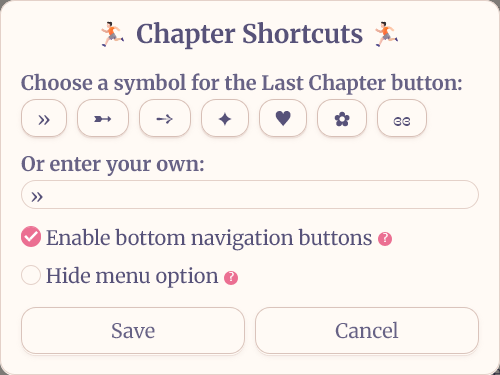
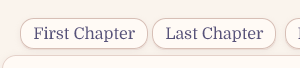
  • A latest chapter button right next to author names on works.
  • First and last chapter buttons added directly on work pages.
  • Fully customizable — pick your own symbol for the shortcut button!

Chapter Shortcuts Menu

Chapter Shortcuts Work Page


⚙️ How to Install

⚠️ Important for Chromium-based browsers: If you're using Chrome, Brave, Vivaldi, or Microsoft Edge on PC, an extra activation step is required. Follow these instructions.

  1. Install with a userscript manager:
  2. On AO3, click Userscripts -> Chapter Shortcuts.
  3. Choose a shortcut symbol or use your own preferred character.

🙌 Credits

📜 Check out my other scripts: