TweetFilter AI

A highly customizable AI rates tweets 1-10 and removes all the slop, saving your braincells!

目前為 2025-04-13 提交的版本,檢視 最新版本

您需要先安裝使用者腳本管理器擴展,如 TampermonkeyGreasemonkeyViolentmonkey 之後才能安裝該腳本。

You will need to install an extension such as Tampermonkey to install this script.

您需要先安裝使用者腳本管理器擴充功能,如 TampermonkeyViolentmonkey 後才能安裝該腳本。

您需要先安裝使用者腳本管理器擴充功能,如 TampermonkeyUserscripts 後才能安裝該腳本。

你需要先安裝一款使用者腳本管理器擴展,比如 Tampermonkey,才能安裝此腳本

您需要先安裝使用者腳本管理器擴充功能後才能安裝該腳本。

(我已經安裝了使用者腳本管理器,讓我安裝!)

你需要先安裝一款使用者樣式管理器擴展,比如 Stylus,才能安裝此樣式

你需要先安裝一款使用者樣式管理器擴展,比如 Stylus,才能安裝此樣式

你需要先安裝一款使用者樣式管理器擴展,比如 Stylus,才能安裝此樣式

你需要先安裝一款使用者樣式管理器擴展後才能安裝此樣式

你需要先安裝一款使用者樣式管理器擴展後才能安裝此樣式

你需要先安裝一款使用者樣式管理器擴展後才能安裝此樣式

(我已經安裝了使用者樣式管理器,讓我安裝!)

作者
obsxrver
評價
0 0 0
版本
Version 1.3.5
建立日期
2025-04-10
更新日期
2025-04-13
尺寸
219.0 KB
授權條款
MIT
腳本執行於

X/Twitter De-Sloppifier

Version 1.3.3.1

Advanced tweet rating and filtering userscript with model selection, enhanced rating indicators, thread hierarchy mapping, and handle management.

Features

  • Tweet Rating: Automatically rates tweets on a scale from 1-10 using AI
  • Filtering System: Hide low-quality tweets based on your chosen threshold
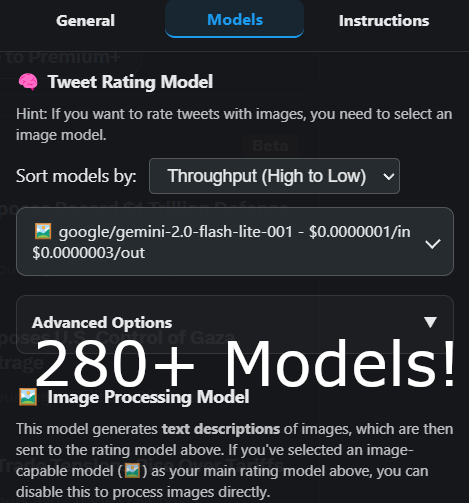
  • Model Selection: Choose from multiple AI models for tweet rating
  • Image Processing: Dedicated image model for analyzing tweet images
  • Real-Time Response Streaming: Stream responses from the AI in real time
  • Thread Context: Improved thread hierarchy detection for better context awareness
  • Media Collection: Automatically collects all media from threads for comprehensive analysis
  • Handle Management: Auto-rate specific accounts as 10/10
  • Custom Instructions: Define your own criteria for how tweets should be rated
  • Dark Theme UI: Sleek interface matching X's design language
  • Parameter Control: Adjust temperature and top-p values for both models
Menu Display Model Selection
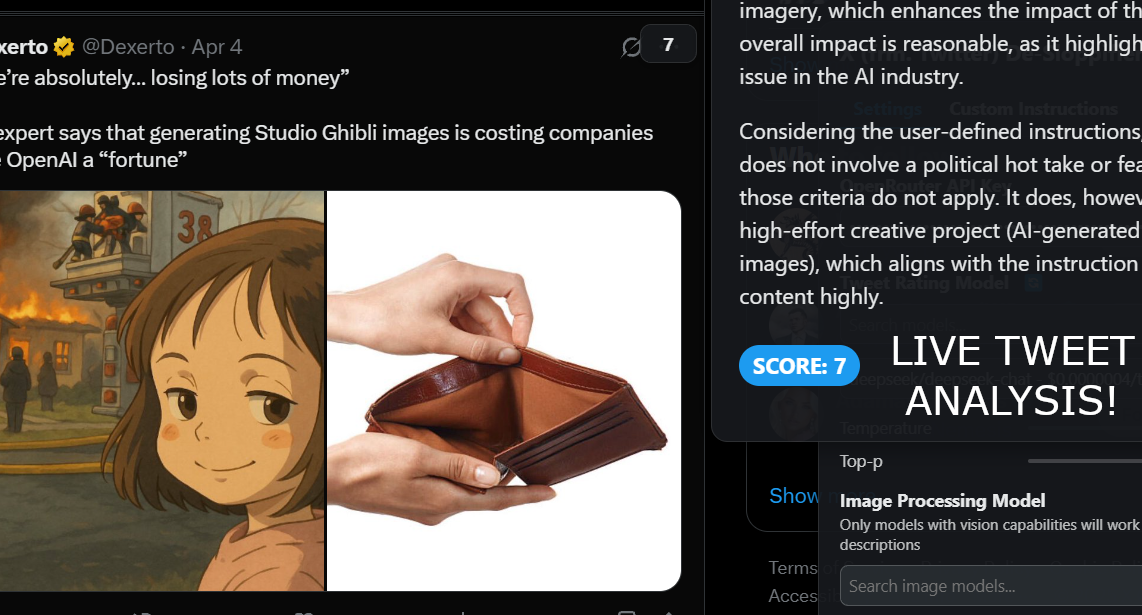
Tweet Analysis Example

Installation

  1. Install a userscript manager like Tampermonkey or Violentmonkey
  2. Install X/Twitter De-Sloppifier from GreasyFork
  3. Get an API key from OpenRouter
  4. Configure the script with your API key

Usage

After installation:

  1. Navigate to Twitter/X
  2. The minimum score filter will appear in the top-right corner
  3. Click "Open Menu" to access the full settings
  4. Input your OpenRouter API key
  5. Choose your preferred models and settings
  6. Save settings and enjoy a cleaner Twitter experience

Menu Display

Configuration

Rating Model Settings

  • Select any OpenRouter-compatible model for tweet rating
  • Adjust temperature and top-p parameters to control randomness
  • Create custom rating instructions to personalize scoring criteria

Image Model Settings

  • Choose a vision-capable model for image analysis
  • Control generation parameters separately from the main model

Handle Management

  • Add Twitter handles to automatically rate as 10/10
  • Useful for accounts you always want to see

How It Works

The userscript analyzes tweets using AI to determine their quality based on:

  1. Text Content: Evaluates writing quality, information value, and relevance
  2. Media Analysis: Uses vision-capable models to understand images in tweets
  3. Context Recognition: Considers conversations and quoted tweets for better rating
  4. Custom Criteria: Applies your personalized rating instructions

Each tweet receives a score from 1-10, which is displayed in the top-right corner. Low-scoring tweets can be automatically hidden based on your threshold setting.

Prerequisites

  • An OpenRouter API key
  • A userscript manager extension
  • Twitter/X account

Limitations

  • API call limits based on your OpenRouter plan
  • Only works on Twitter/X web interface, not the mobile app
  • Processing tweets may take a moment depending on the model selected

Contributing

Contributions are welcome! Feel free to submit issues or pull requests.

License

This userscript is provided as-is under the MIT License.

Acknowledgments

  • Thanks to OpenRouter for providing model access
  • Inspired by the need for a better social media experience