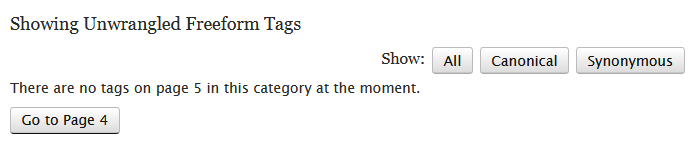
AO3: [Wrangling] Empty Bin links to Previous Page

adds a button to the previous page, if there are no more tags on this page

您需要先安裝使用者腳本管理器擴展,如 TampermonkeyGreasemonkeyViolentmonkey 之後才能安裝該腳本。

You will need to install an extension such as Tampermonkey to install this script.

您需要先安裝使用者腳本管理器擴充功能,如 TampermonkeyViolentmonkey 後才能安裝該腳本。

您需要先安裝使用者腳本管理器擴充功能,如 TampermonkeyUserscripts 後才能安裝該腳本。

你需要先安裝一款使用者腳本管理器擴展,比如 Tampermonkey,才能安裝此腳本

您需要先安裝使用者腳本管理器擴充功能後才能安裝該腳本。

(我已經安裝了使用者腳本管理器,讓我安裝!)

你需要先安裝一款使用者樣式管理器擴展,比如 Stylus,才能安裝此樣式

你需要先安裝一款使用者樣式管理器擴展,比如 Stylus,才能安裝此樣式

你需要先安裝一款使用者樣式管理器擴展,比如 Stylus,才能安裝此樣式

你需要先安裝一款使用者樣式管理器擴展後才能安裝此樣式

你需要先安裝一款使用者樣式管理器擴展後才能安裝此樣式

你需要先安裝一款使用者樣式管理器擴展後才能安裝此樣式

(我已經安裝了使用者樣式管理器,讓我安裝!)

作者
escctrl
今日安裝
0
安裝總數
13
評價
0 0 0
版本
1.1
建立日期
2024-03-22
更新日期
2024-03-22
尺寸
1.2 KB
授權條款
MIT
腳本執行於

If you just finished wrangling the tags on, say, page 5, the wrangulator refreshes to show you a cheerful message that there aren't any more tags. You'd have to manually change the page in the (long) URL, or select the "Unwrangled" tag and recreate your sorting, to continue wrangling in the bin.

This script adds a couple of words that there aren't any more on page 5, and also gives you a handy link to page 4 (keeping all your sorting choices) so you can keep calm & carry on.