GC Hide Wishlist Add Outside Of Search

Hides the "Add to Wishlist" helper icon on every page other than search on grundos.cafe.

您需要先安裝使用者腳本管理器擴展,如 TampermonkeyGreasemonkeyViolentmonkey 之後才能安裝該腳本。

You will need to install an extension such as Tampermonkey to install this script.

您需要先安裝使用者腳本管理器擴充功能,如 TampermonkeyViolentmonkey 後才能安裝該腳本。

您需要先安裝使用者腳本管理器擴充功能,如 TampermonkeyUserscripts 後才能安裝該腳本。

你需要先安裝一款使用者腳本管理器擴展,比如 Tampermonkey,才能安裝此腳本

您需要先安裝使用者腳本管理器擴充功能後才能安裝該腳本。

(我已經安裝了使用者腳本管理器,讓我安裝!)

你需要先安裝一款使用者樣式管理器擴展,比如 Stylus,才能安裝此樣式

你需要先安裝一款使用者樣式管理器擴展,比如 Stylus,才能安裝此樣式

你需要先安裝一款使用者樣式管理器擴展,比如 Stylus,才能安裝此樣式

你需要先安裝一款使用者樣式管理器擴展後才能安裝此樣式

你需要先安裝一款使用者樣式管理器擴展後才能安裝此樣式

你需要先安裝一款使用者樣式管理器擴展後才能安裝此樣式

(我已經安裝了使用者樣式管理器,讓我安裝!)

作者
DeviPotato
今日安裝
1
安裝總數
33
評價
0 0 0
版本
2
建立日期
2024-03-03
更新日期
2024-03-03
尺寸
907 位元組
授權條款
MIT
腳本執行於

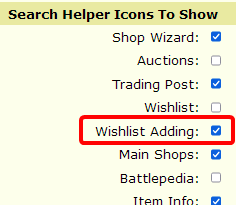
This script will automatically hide the "Add to Wishlist" helper search button on all areas of the site other than searching for items via the sidebar. This makes it convenient to add things to your wishlist when you actually want to and get it out of the way when you don't.

In order for the button to be visible in item searches, the "Wishlist Adding" search helper must be ENABLED in Site Preferences!
You must also not be using sidebar/site-wide CSS to hide the button.