MZ Tactics Selector

Adds a dropdown menu with overused tactics.

目前為 2023-06-07 提交的版本,檢視 最新版本

您需要先安裝使用者腳本管理器擴展,如 TampermonkeyGreasemonkeyViolentmonkey 之後才能安裝該腳本。

You will need to install an extension such as Tampermonkey to install this script.

您需要先安裝使用者腳本管理器擴充功能,如 TampermonkeyViolentmonkey 後才能安裝該腳本。

您需要先安裝使用者腳本管理器擴充功能,如 TampermonkeyUserscripts 後才能安裝該腳本。

你需要先安裝一款使用者腳本管理器擴展,比如 Tampermonkey,才能安裝此腳本

您需要先安裝使用者腳本管理器擴充功能後才能安裝該腳本。

(我已經安裝了使用者腳本管理器,讓我安裝!)

你需要先安裝一款使用者樣式管理器擴展,比如 Stylus,才能安裝此樣式

你需要先安裝一款使用者樣式管理器擴展,比如 Stylus,才能安裝此樣式

你需要先安裝一款使用者樣式管理器擴展,比如 Stylus,才能安裝此樣式

你需要先安裝一款使用者樣式管理器擴展後才能安裝此樣式

你需要先安裝一款使用者樣式管理器擴展後才能安裝此樣式

你需要先安裝一款使用者樣式管理器擴展後才能安裝此樣式

(我已經安裝了使用者樣式管理器,讓我安裝!)

作者
douglass
評價
0 0 0
版本
4.2
建立日期
2023-06-02
更新日期
2023-06-07
尺寸
23.8 KB
授權條款
MIT
腳本執行於

MZ Tactics Selector

Features

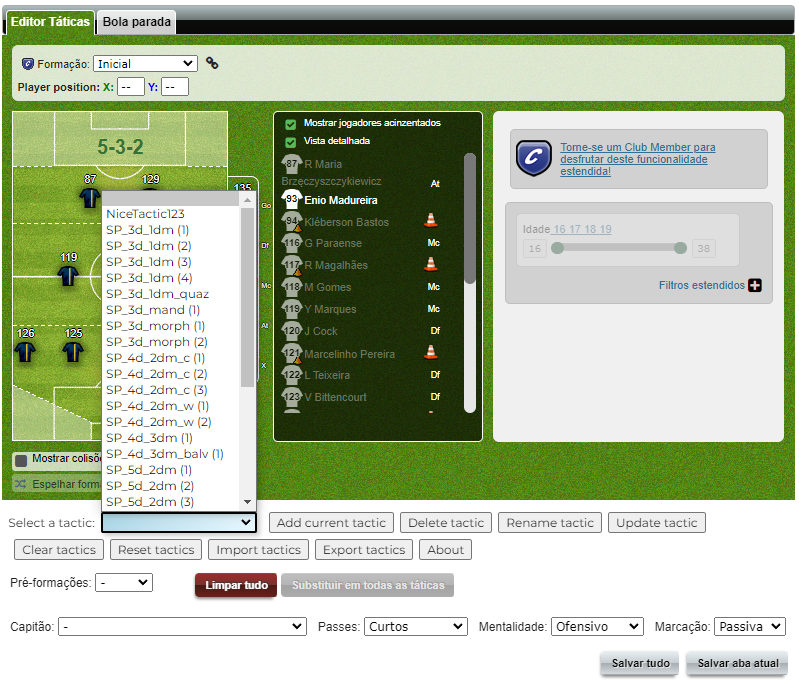
  • The script adds a dropdown menu to the tactics page
  • Users can select a tactic from the available options in the dropdown menu. When a tactic is selected there the players on the pitch are rearranged to match the selected tactic.
  • Users can save their own custom tactics by clicking the "Add current tactic" button. They will be prompted to enter a name for the tactic and the tactic will be saved.
  • The script provides buttons to delete, rename, and update existing stored tactics.
  • It is possible to clear (empty) the available tactics or reset to default settings.
  • Last but not least, it is also possible to import/export tactics.

Installation

To use MZ Tactics Selector, you'll need a userscript manager installed in your browser. Follow these steps to install the script:

  1. Install a userscript manager extension for your browser — Tampermonkey is a good option.
  2. Install the script.
  3. Enjoy.

Screenshot

Example Screenshot

Contributing

Suggestions are always welcome.