Youtube Audio Mode

Listen to only the audio on YouTube without loading the video.


您需要先安裝使用者腳本管理器擴展,如 TampermonkeyGreasemonkeyViolentmonkey 之後才能安裝該腳本。

您需要先安裝使用者腳本管理器擴充功能,如 TampermonkeyViolentmonkey 後才能安裝該腳本。

您需要先安裝使用者腳本管理器擴充功能,如 TampermonkeyViolentmonkey 後才能安裝該腳本。

您需要先安裝使用者腳本管理器擴充功能,如 TampermonkeyUserscripts 後才能安裝該腳本。

你需要先安裝一款使用者腳本管理器擴展,比如 Tampermonkey,才能安裝此腳本

您需要先安裝使用者腳本管理器擴充功能後才能安裝該腳本。

(我已經安裝了使用者腳本管理器,讓我安裝!)

你需要先安裝一款使用者樣式管理器擴展,比如 Stylus,才能安裝此樣式

你需要先安裝一款使用者樣式管理器擴展,比如 Stylus,才能安裝此樣式

你需要先安裝一款使用者樣式管理器擴展,比如 Stylus,才能安裝此樣式

你需要先安裝一款使用者樣式管理器擴展後才能安裝此樣式

你需要先安裝一款使用者樣式管理器擴展後才能安裝此樣式

你需要先安裝一款使用者樣式管理器擴展後才能安裝此樣式

(我已經安裝了使用者樣式管理器,讓我安裝!)

作者
liquorburn
今日安裝
0
安裝總數
342
評價
6 1 3
版本
0.2.8
建立日期
2022-07-05
更新日期
2022-07-28
尺寸
5.2 KB
授權條款
MIT
腳本執行於

Youtube Audio Mode installs on openuserjs.org Youtube Audio Mode installs on greasyfork.org Donate to this project by using Buy Me A Coffee

Youtube Audio Mode

This userscript add a toggle to switch audio mode on Youtube.
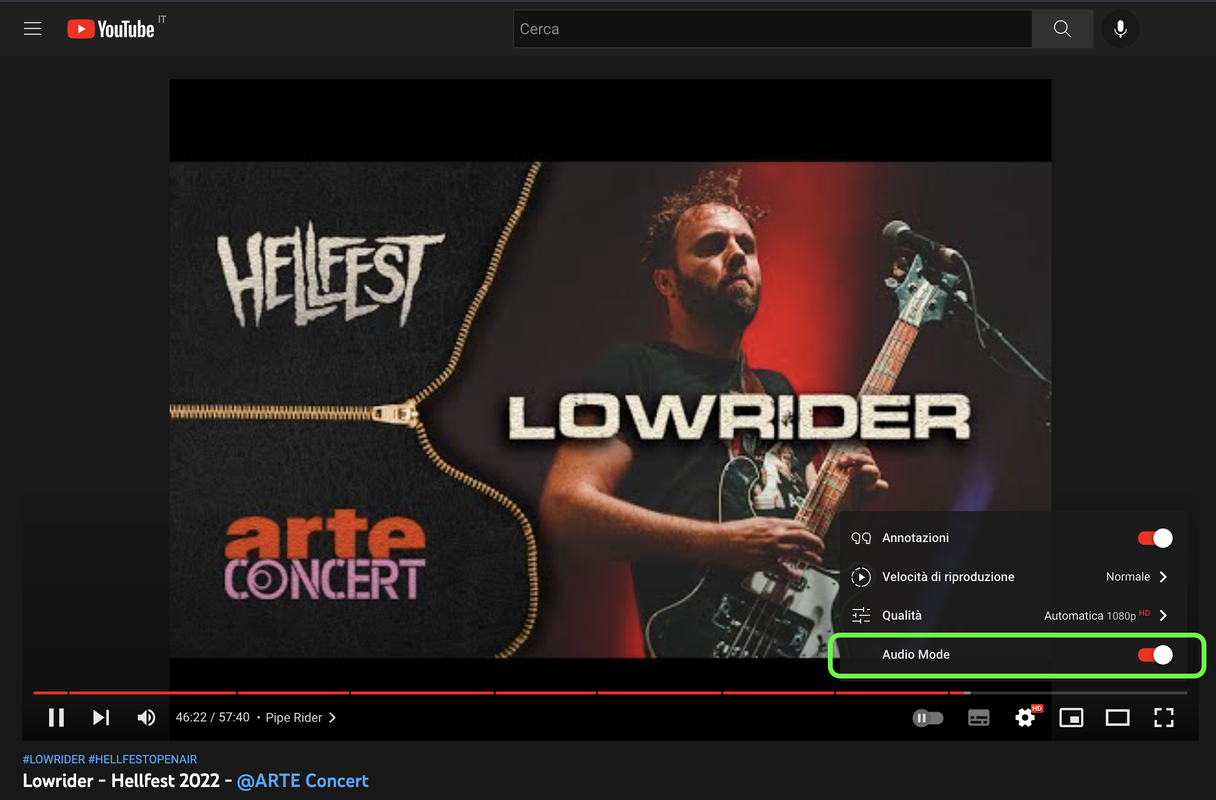
Screenshot

Screenshot of my userscript which shows the toggle to enable/disable Audio Mode

PLEASE NOTE

I've found the original userscript on Github: https://github.com/teaqu/youtube-audio-mode but it's not working anymore so I've opened an issue. After a month without receiving a reply I've decided to update the script myself. The first thing I've noticed is that the issue I've opened was totally wrong.

Known issues

  • When activating audio mode, the userscript starts making the same Youtube-native FETCH request multiple times (3-4 times). The request is for the stream at timeline 0:00, therefore the audio keeps restarting and is pretty annoying. Fixed in v.0.2.8

Feedback appreciated
