BlueCat Address Manager Fixed Header

Add a "Go to Top" button and fix Header (Still experimental for certain tables) in BlueCat Address Manager

您需要先安裝使用者腳本管理器擴展,如 TampermonkeyGreasemonkeyViolentmonkey 之後才能安裝該腳本。

You will need to install an extension such as Tampermonkey to install this script.

您需要先安裝使用者腳本管理器擴充功能,如 TampermonkeyViolentmonkey 後才能安裝該腳本。

您需要先安裝使用者腳本管理器擴充功能,如 TampermonkeyUserscripts 後才能安裝該腳本。

你需要先安裝一款使用者腳本管理器擴展,比如 Tampermonkey,才能安裝此腳本

您需要先安裝使用者腳本管理器擴充功能後才能安裝該腳本。

(我已經安裝了使用者腳本管理器,讓我安裝!)

你需要先安裝一款使用者樣式管理器擴展,比如 Stylus,才能安裝此樣式

你需要先安裝一款使用者樣式管理器擴展,比如 Stylus,才能安裝此樣式

你需要先安裝一款使用者樣式管理器擴展,比如 Stylus,才能安裝此樣式

你需要先安裝一款使用者樣式管理器擴展後才能安裝此樣式

你需要先安裝一款使用者樣式管理器擴展後才能安裝此樣式

你需要先安裝一款使用者樣式管理器擴展後才能安裝此樣式

(我已經安裝了使用者樣式管理器,讓我安裝!)

作者
Marius Galm
今日安裝
0
安裝總數
11
評價
0 0 0
版本
7
建立日期
2018-02-20
更新日期
2018-11-15
尺寸
5.7 KB
授權條款
MIT
腳本執行於

- this is still experimental -

Hello to all BlueCat Administrators out there.

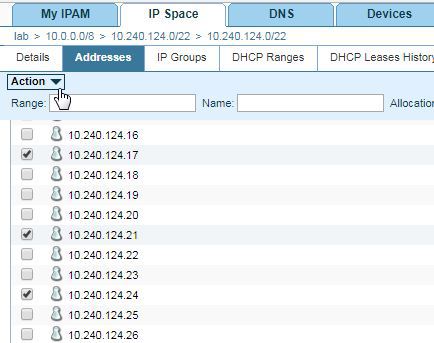
Have you ever selected multiple IPs or DNS records and missing the button to modify/delete them? Scrolling back up is the way to go, but fixing the header would be easier, right? Here is a script that can help you out by fixing the header of the current table (well, I must admit not all of it ;-D).

Before:

before-state

After:

after-state

If anyone can figure this out, I'd be glad for the help.

Currently running on: IP4BlockPage, IP4NetworkPage and ZoneDetails