Adds some extra functions to AzLyrics and changes theme
目前為
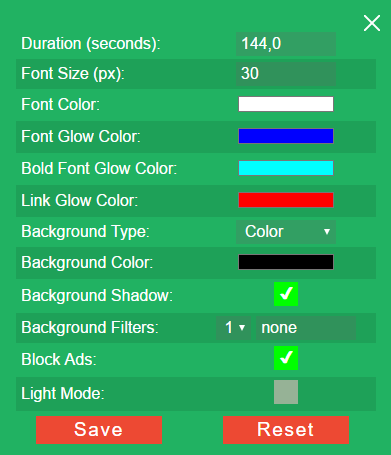
This script changes theme of AzLyrics and lets you customize this theme. It also adds autoslide feature. Autoslide feature simply simulates mouse scroll. Script counts lines of lyrics and calculate an estimated time for scroll duration. It does not guarantees perfect timing for a song. So If you are not happy with calculated scroll duration time, you could use custom duration time. The page will scroll automatically when you click 'start' button. It also adds a link of artists other songs page to artist name at top of page (for easy navigation). Script uses JQuery for scrolling feature.
This script is coded for CHROME(Tampermonkey) ONLY. It may not work on other browsers.
Usage: This is the start button. Click it to start scrolling.
 This is the stop button. Click it to stop scrolling.
 This is the setting button. Click it to open settings. You can adjust scroll duration or customize theme from settings.
This is settings menu: