Mint.com tags display

Show tags in the transactions listing on Mint.com.

当前为 2015-09-18 提交的版本,查看 最新版本

您需要先安装一款用户脚本管理器扩展,例如 Tampermonkey 篡改猴Greasemonkey 油猴子Violentmonkey 暴力猴,才能安装此脚本。

您需要先安装一款用户脚本管理器扩展,例如 Tampermonkey 篡改猴,才能安装此脚本。

您需要先安装一款用户脚本管理器扩展,例如 Tampermonkey 篡改猴Violentmonkey 暴力猴,才能安装此脚本。

您需要先安装一款用户脚本管理器扩展,例如 Tampermonkey 篡改猴Userscripts ,才能安装此脚本。

您需要先安装一款用户脚本管理器扩展,例如 Tampermonkey 篡改猴,才能安装此脚本。

您需要先安装一款用户脚本管理器扩展后才能安装此脚本。

(我已经安装了用户脚本管理器,让我安装!)

您需要先安装一款用户样式管理器扩展,比如 Stylus,才能安装此样式。

您需要先安装一款用户样式管理器扩展,比如 Stylus,才能安装此样式。

您需要先安装一款用户样式管理器扩展,比如 Stylus,才能安装此样式。

您需要先安装一款用户样式管理器扩展后才能安装此样式。

您需要先安装一款用户样式管理器扩展后才能安装此样式。

您需要先安装一款用户样式管理器扩展后才能安装此样式。

(我已经安装了用户样式管理器,让我安装!)

作者
mddub
评分
0 0 0
版本
1.0.0
创建于
2015-09-18
更新于
2015-09-18
大小
5.2 KB
许可证
暂无
适用于

Mint.com tags display

Ever been annoyed that Mint lets you add tags while editing transactions, and then you never see them again? This user script makes the tags visible:
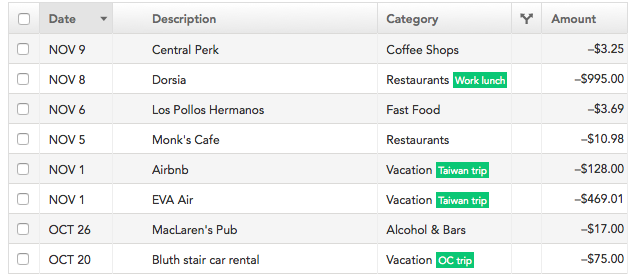
Screenshot

Installation

First, install a browser extension which lets you add user scripts: GreaseMonkey if you're on Firefox, or TamperMonkey if you're on Chrome, Safari, or Opera. (You can also follow more detailed instructions for your particular browser.)

Next, click here and you will be prompted to install Mint.com tags display.

More information

This blog post discusses the motivation behind this user script, how it works, and some opinions on Mint.

Questions? [email protected]