YouTube Screenshot Frame

Capture YouTube screenshots with a hotkey (default is key = 'b'). Filename includes title, timestamp, and capture time.

您需要先安装一款用户脚本管理器扩展,例如 Tampermonkey 篡改猴Greasemonkey 油猴子Violentmonkey 暴力猴,才能安装此脚本。

您需要先安装一款用户脚本管理器扩展,例如 Tampermonkey 篡改猴,才能安装此脚本。

您需要先安装一款用户脚本管理器扩展,例如 Tampermonkey 篡改猴Violentmonkey 暴力猴,才能安装此脚本。

您需要先安装一款用户脚本管理器扩展,例如 Tampermonkey 篡改猴Userscripts ,才能安装此脚本。

您需要先安装一款用户脚本管理器扩展,例如 Tampermonkey 篡改猴,才能安装此脚本。

您需要先安装一款用户脚本管理器扩展后才能安装此脚本。

(我已经安装了用户脚本管理器,让我安装!)

您需要先安装一款用户样式管理器扩展,比如 Stylus,才能安装此样式。

您需要先安装一款用户样式管理器扩展,比如 Stylus,才能安装此样式。

您需要先安装一款用户样式管理器扩展,比如 Stylus,才能安装此样式。

您需要先安装一款用户样式管理器扩展后才能安装此样式。

您需要先安装一款用户样式管理器扩展后才能安装此样式。

您需要先安装一款用户样式管理器扩展后才能安装此样式。

(我已经安装了用户样式管理器,让我安装!)

作者
dpi0
日安装量
0
总安装量
6
评分
0 0 0
版本
1.0
创建于
2025-04-15
更新于
2025-04-15
大小
3.6 KB
许可证
MIT
适用于

current default key is 'b' pressing 'b' on a youtube video will take a screenshot with the file format YS_video-title_timestamp_date.png

example screenshot filename: YS_why-are-96,000,000-black-balls-on-this-reservoir__00-00-05_16-Apr-2025_11-25-07.png

[!NOTE] You can change the default keybind via the violetmonkey addon menu.
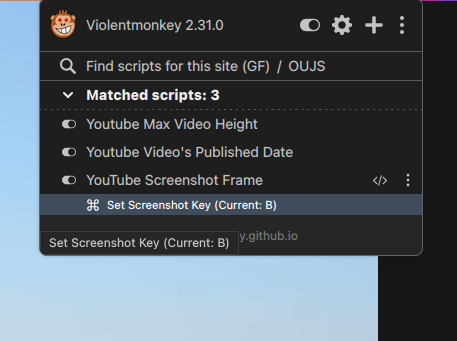
change-keybind-violetmonkey