自定义浏览器平台信息,以便于你可以自由访问目标网站的移动端或者桌面端。此脚本仅针对JavaScript检测有效,对于服务端检测无效。
当前为
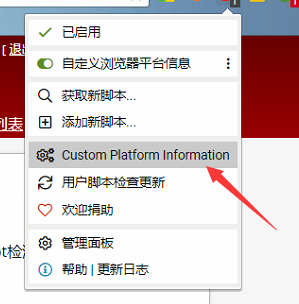
在菜单中单击该选项以自定义相关信息。 Click this option in the menu to customize the relevant information.
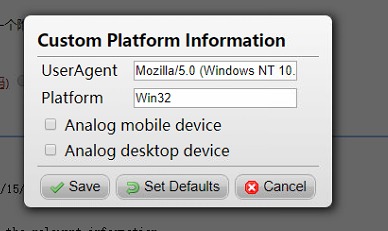
UserAgent与Platform会影响所有网页。如果勾选“Analog mobile device”将会把浏览器尽可能模拟成移动端浏览器;如果勾选“Analog desktop device”将会把浏览器尽可能模拟成桌面端浏览器。如果两个选项同时选择,将会执行Analog mobile device。如果两个选项均不选择,则表示浏览器默认。
The UserAgent and Platform affect all web pages. Checking "Analog mobile device" will simulate the browser as mobile as much as possible; Checking "Analog desktop device" will simulate the browser as much as possible as a desktop browser. If both options are selected at the same time, "Analog mobile device" is executed. If neither option is selected, the browser defaults.
此脚本仅针对JavaScript检测有效,对于服务端检测没有任何效果。由于JavaScript检测浏览器类型有很多方法,因此如果你碰到无法欺骗的网页,可以告诉我,以便于我更新脚本。
This script is only valid for JavaScript detection and has no effect on server-side detection. Because JavaScript has many ways to detect browser types, if you encounter a web page that you can't cheat on, tell me so I can update the script.
